Acquiring a new SaaS solution to add to our tech stack might seem like a good idea. It’s a common practice to unlock efficiencies through breakthrough technology. Without SaaS implementation, however, that process can quickly spiral out of control.
Today, I’ll review SaaS implementation and how to do it correctly. We’ll explore how orchestration works, the key team members in charge of implementation, the methodologies available, and how it compares to onboarding, before diving into specific and highly actionable best practices. I’ll also look into change management, the overarching process that often sets the standards for SaaS operations such as implementation. Lastly, we’ll outline what role customer success has in the SaaS implementation process, how to overcome common challenges, and how new AI-enabled tactics can unlock faster, more reliable implementation.
What Is SaaS Implementation?
SaaS implementation is the process of adoption, configuration, and integration of a new SaaS platform with the current tech stack of an organization. It is typically a highly involved project that concerns several teams throughout the organization, such as engineering, IT, and those that would use the tool in their daily operations.
Depending on the impact, scope, breadth, and complexity of the SaaS tool in question, implementation can take anywhere from a few days to several months. In enterprise scenarios, implementation can even take up to a year. Each stage of the process generally involves other smaller elements such as training, bug-fixing, cross-departmental feedback and alignment, and testing.
Lastly, some SaaS vendors recognize the complexity of their product and the need for advanced, in-depth implementation, and offer assistance. This help can come in different forms – from full concierge onboarding programs, to advanced implementation guides and KB articles, to full implementation teams that help customers along the way.
What Is SaaS Implementation Orchestration?
SaaS implementation is, in essence, a regular SaaS process. As such, it can be conducted following classic SaaS process orchestration methodology. Essentially, orchestration means all steps involved are treated as a clear business process, with a clear goal. Each orchestration process typically must include dependencies, integration patterns, security, observability, and change management. While most SaaS can have some methodology for handling internal processes, orchestration is more common in enterprise scenarios where service delivery is key.
Why Is SaaS Implementation Important?
The short version is that SaaS implementation is important because without it, the tools and platforms that an organization purchases would not work correctly or up to their standards.
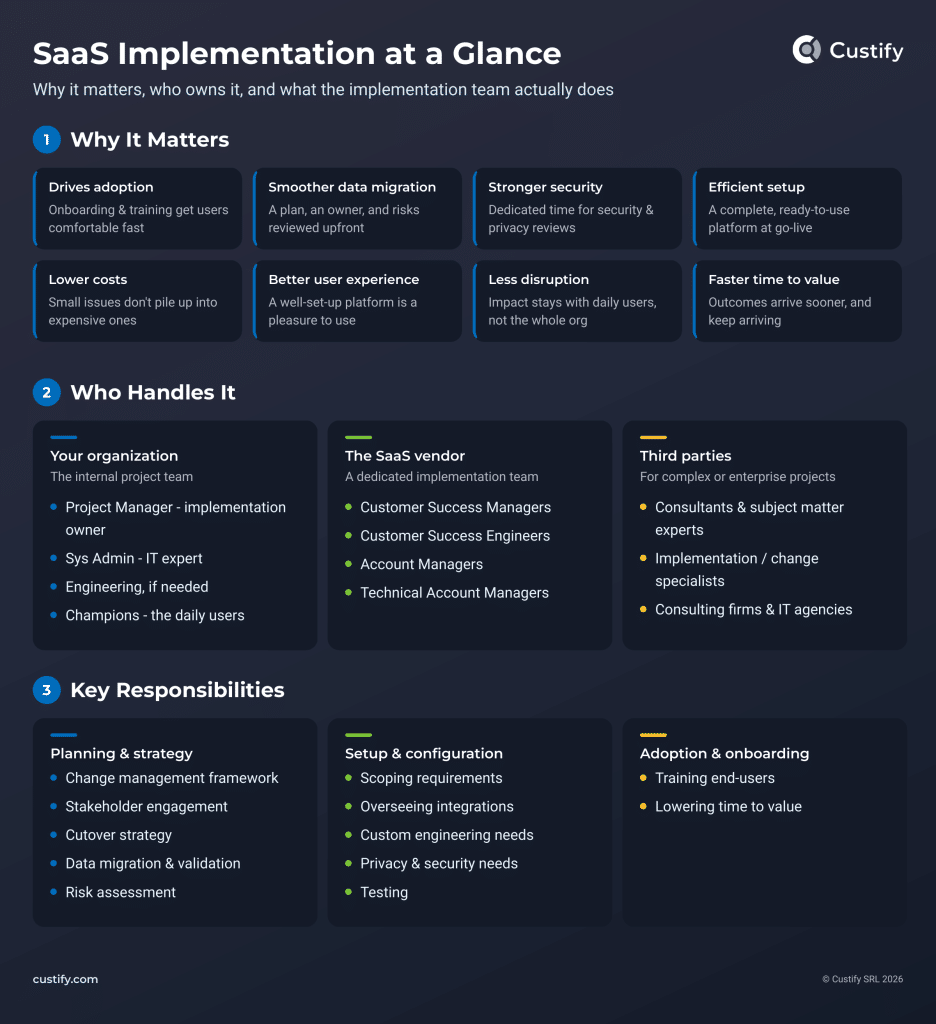
However, there are a number of benefits that come from having a buttoned-up SaaS implementation process:
- Ensures adoption. Implementation includes making sure your users are actually onboarded and trained on the new platform. That alone drives product adoption significantly. The rest of the implementation process also helps: having a properly set up platform naturally makes users more comfortable using it.
- Optimizes data migration. One of the essential steps of implementing a new SaaS is migrating or importing the necessary data onto the new platform. That can be a mini-project in itself. Implementation involves building a project plan, designating an owner, and reviewing risks – no matter how small.
- Enhances security. By going through a purposeful implementation process, you can actually carve time off specifically for reviewing security and privacy requirements.
- Makes setup more efficient. A full-blown implementation project will also deliver a more complete, ready-to-use platform by the end.
- Cuts down on costs. If you don’t handle SaaS implementation responsibly, all the small issues that can arise will add up and raise the cost of adoption while delaying any value you may’ve received from the platform otherwise.
- Improves user experience. With a proper implementation process, your users will also have a better experience once they’re onboarded onto the platform.
- Impacts fewer people and processes. If you’re not intentional about your new software adoption pipeline, it may end up negatively impacting your entire organization. If you keep it lean, there’s a good chance it will only impact those using it day-to-day.
- Speeds up value delivery. Proper SaaS implementation processes lower the time to value and improve outcome delivery.
Rushing to go live will only lead to setup issues, adoption gaps, and poor security and privacy. These issues can compound and delay the time to value, leading software adopters to wonder why they ever bought the solution, and software developers to face growing challenges with customer churn.
Who Handles SaaS Implementation?
From your organization’s side, a SaaS implementation project is traditionally handled by:
- Project Manager (designated implementation project owner)
- Sys Admin (IT expert)
- Engineering (if necessary)
- Champions (daily users who will be using the software)
From the SaaS vendor’s side, it’s usually overseen by a dedicated software implementation team consisting of one or more of the following:
- Customer Success Managers
- Customer Success Engineers
- Account Managers
- Technical Account Managers
Occasionally, for particularly complex or enterprise-level SaaS platform implementation projects, some organizations will opt for third-party assistance, which can include:
- Consultants
- SMEs (subject matter experts)
- Implementation/change management specialists
- Consulting firms
- IT agencies
| Responsibility | Implementation Methodology | Your team | SaaS vendor team | Third-party value (enterprise) |
|---|---|---|---|---|
| Phase 1 · Planning and Strategy | ||||
| Change management & stakeholder engagement | The project owner builds the change framework, maps stakeholders, and sets a communication cadence. | Project Manager (owner), Champions | CSM advises on rollout best practices | Change management specialists run org-wide programs across departments and regions |
| Cutover strategy | The team chooses a go-live approach (big bang vs. phased), schedules cutover windows, and defines rollback criteria. | Project Manager, Sys Admin | CSM / TAM co-plan the cutover | Consultants de-risk complex multi-system cutovers |
| Data migration, validation & risk assessment | Data is inventoried and mapped, a migration owner is designated, and risks are reviewed. | Sys Admin, Engineering | CS Engineer handles imports and validation | SMEs validate data quality across legacy systems at scale |
| Phase 2 · Platform Setup and Configuration | ||||
| Scoping & integrations | Requirements are documented, then integrations with the existing stack are mapped, connected, and verified. | Sys Admin, Engineering | TAM / CS Engineer configure and oversee integrations | IT agencies build custom middleware and connectors |
| Custom engineering | Gaps between out-of-the-box functionality and business needs are closed with custom builds or API management. | Engineering | CS Engineers scope feasibility and support the build | Agencies deliver custom work without burdening the internal roadmap |
| Privacy, security & testing | Dedicated time is carved out for security and privacy reviews, access controls, and user acceptance testing before go-live. | Sys Admin, Champions (UAT) | TAM documents compliance and supports testing | Consultants run security audits for regulated industries |
| Phase 3 · Adoption and Onboarding | ||||
| End-user training | Role-based training and documentation are delivered before and at go-live, so users are comfortable from day one. | Champions lead peer training; PM coordinates | CSM delivers training sessions and materials | Training specialists scale programs to thousands of seats |
| Lowering time to value | Success metrics are tracked from day one, and quick wins are prioritized to prove value early. | Project Manager, Champions | CSM monitors adoption and account health | Not typically needed, consultants may align rollout to business KPIs |
Key Responsibilities of a SaaS Implementation Team
Implementation teams have a wide range of responsibilities, from simply setting up the platform to evaluating security risks, handling data migration, and overseeing security needs.
To ensure a lean implementation process, particularly for highly complex SaaS, both the vendor and the customer must work in sync to devise a strategy, configure the software, and support user adoption through training and support materials.
1. Planning and Strategy:
- Change Management and Stakeholder Engagement. The project owner builds the change framework, maps stakeholders, and sets a communication cadence.
- Cutover Strategy. The team chooses a go-live approach (big bang vs. phased), schedules cutover windows, and defines rollback criteria.
- Data Migration and Validation. Data is inventoried and mapped, and a migration owner is designated.
- Risk Assessment. A simple risk assessment matrix for implementation can ensure you’ve got contingencies.
2. Platform Setup and Configuration:
- Scoping and Integrations. Requirements are documented, then integrations with the existing stack are mapped, connected, and verified.
- Custom Engineering Needs. Gaps between out-of-the-box functionality and business needs are closed with custom builds or API work.
- Overseeing Privacy and Security Needs. Dedicated time is carved out for security and privacy reviews and access controls.
- User Acceptance Testing. Before going live, adequate testing must be conducted to ensure all the interconnected parts of implementation are working well together.
3. Adoption and Onboarding:
- End-user training. Role-based training and documentation are delivered before and at go-live, so users are comfortable from day one.
- Lowering time to value. Success metrics are tracked from day one, and quick wins are prioritized to prove value early.
What’s the Difference between SaaS Onboarding and Implementation?
Basically, onboarding is more about the relationship, building connection, and understanding a customer’s desired outcomes. A SaaS vendor’s onboarding is about alignment, shared goals, and collaboration. Implementation, on the other hand, is about going live. It’s about ensuring that a SaaS product fits your business needs and taking the necessary steps to ensure a perfect fit that enables those shared goals established in the onboarding.
Traditionally, some definitions have placed implementation as part of onboarding, and certainly it can be seen as such since both mostly occur at the same time. However, I’d argue they are not the same, and in fact it might serve you better to think of them as separate:
- If you’re a SaaS vendor offering both onboarding and implementation assistance, it’s useful to have different processes and methodologies in place for both, as well as distinct teams (often led by an Account Manager or Customer Success Manager).
- If you’re the organization purchasing the SaaS solution, it’s also helpful to conceptualize both as separate processes. This allows you to give implementation the attention it deserves, as it can often snowball into a giant process (particularly for enterprise SaaS or complex migration scenarios).
So instead of lumping them together, think of them as two parallel processes, each connecting to specific points in the other, and most often governed by the same team lead, but ultimately distinct. Here’s a simple breakdown of the differences:
| SaaS Onboarding | SaaS Implementation | |
|---|---|---|
| Scope | Building customer relationships, providing tailored assistance | Configuring the platform, getting it ready for use, and demonstrating ROI |
| Owner | Customer Success Manager | Project Manager / Account Manager |
| Approach | Empathetic | Technical |
| Requirements | Emotional intelligence Communication skillsOperational skillsCustomer success training | Deep technical knowledge Communication skillsOperational skillsProject management training |
| Teams Involved | Customer SuccessSalesAccount ManagementImplementation Project TeamEngineeringUsers | Implementation Project TeamCustomer SuccessEngineeringUsersAccount Management |
The onboarding and the implementation stages are the most critical stages in the customer journey. While the onboarding stage sets the tone for any future relationship between the customer and the company, the implementation stage proves the true ROI by ensuring that the customer can (and will) achieve their desired outcomes with the product.
– Tal Nagar, Founding Customer Success Manager, Dropstat, Why Implementation Isn’t Onboarding
What Are the Best Practices for Successful SaaS Implementation?
Before Implementation: Choosing the SaaS Solution
Choosing a SaaS provider will always be a mix of requirements, costs, and objectives. Implementation and onboarding will always play a part – if you’re chasing a quick TTV and ROI, the faster you go live, the better, so look for SaaS with:
- Clear, established implementation workflows (with a designated project owner)
- White-glove onboarding programs (such as Custify’s concierge onboarding).
- AI-assisted setup and implementation that can speed up those initial stages.
- A designated customer care team such as customer service, success, and account management.
- An extensive list of publicly available testimonials and reviews (ideally, they also mention their own implementation experience).
1. Settle on a Clear List of Objectives and Measurable Outcomes
Start with why you’re doing this in the first place. This simple practice can save you plenty of headaches down the line and reduce unnecessary spend and rework. Make sure your objectives are SMART (specific, measurable, achievable, relevant, and time-bound). A simple way to approach it is:
- Visualize key desired outcomes. Start with achievable outcomes – what’s possible with the new tool, what new efficiencies do you want to unlock, how do you hope it will affect your business as a whole?
- Tie objectives to those outcomes. Tie specific objectives to those outcomes: what is this tool specifically able to help you achieve?
- Find KPIs and related metrics tied to the objectives. Then, from those objectives, come up with metrics and KPIs that would most affect progress towards them (either positively or negatively).
- Track KPIs and metrics at scale. Use your existing tools (such as your customer success platform) to build dashboards where you can track those metrics daily during the implementation stage, ensuring visibility for all stakeholders.
- Set deadlines and track progress. Lastly, don’t forget the time-bound element – set deadlines for each stage of the implementation and work strategically towards them.
2. Determine Your SaaS Implementation Methodology
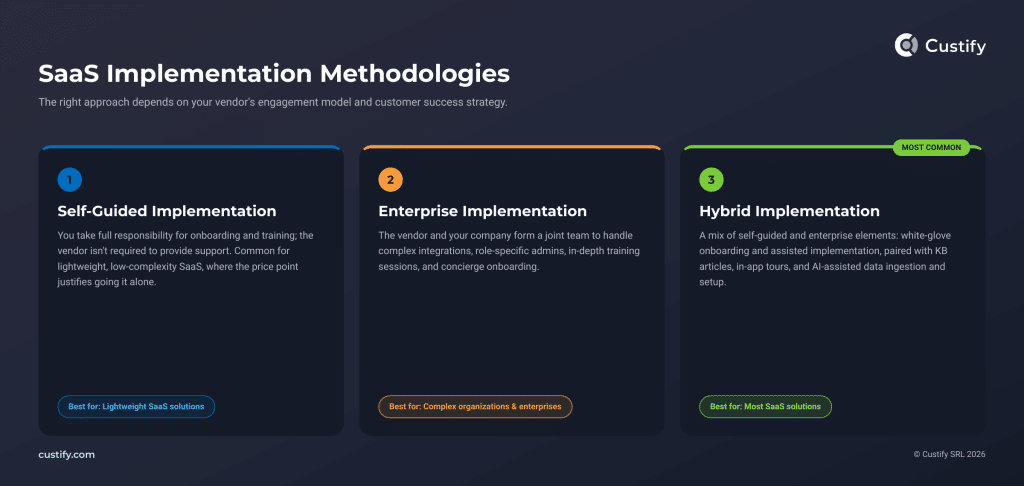
Any SaaS implementation usually has one of three methodologies. Which one you go for depends largely on the vendor and their customer engagement model and customer success strategy.
- Self-guided implementation. You take full responsibility for onboarding and training; the vendor is not required to provide support. Many lightweight, low-complexity SaaS opt for this approach as their low price point justifies the lack of guided onboarding and implementation.
- Enterprise implementation. In this scenario, the vendor and the company form a team to meet the SaaS implementation needs of large organizations through complex integration, role-specific employees (admins), in-depth training sessions, and concierge onboarding.
- Hybrid implementation. Most SaaS vendors offer this type of implementation, which represents a mix of self-guided with enterprise elements: white-glove onboarding and assisted implementation paired with KB articles, in-app walkthroughs and training, and AI-assisted data ingestion and setup.
What’s the Best SaaS Implementation Methodology?
The best methodology for SaaS implementation is typically the hybrid one, unless you’re in an enterprise scenario or if the product is a simple, low-lift SaaS solution.
- Best for most SaaS – Hybrid implementation
- Best for complex organizations and enterprises – Enterprise implementation
- Best for adopting lightweight SaaS solutions – Self-guided implementation
3. Follow Change Management and Project Management Best Practices
These are simple, classic change management and project management tasks designed to minimize the impact of any change on your organization and your team’s day-to-day activities.
Personnel-related tasks:
- Establish a project owner: someone with authority in the implementation team who can remove blockers and make work efficient.
- Determine stakeholders: write down everyone who needs visibility, everyone with decision-making power, and everyone else who will be impacted.
- Decide executive sponsors: management-level people who can help the project owner with any approvals or complex decisions.
- Identify internal champions: who will ultimately use the SaaS product? What are their needs? How are you ensuring they get heard?
- Identify teams affected by the change: from C-level execs to users and even your customers, depending on the product you’re trying to implement. Write down how the change can affect them and try to mitigate negative effects.
Project-related tasks:
- Set SaaS implementation timeline. Build a clear timeline for implementation.
- Pinpoint milestones towards full adoption. Add milestones on the timeline and set conditions for each.
- Determine project stages. Some milestones will determine when you reach new stages. Set prerequisites for entering each new stage and always monitor your progress.
- Compile a list of changes and what to expect for your internal team. Communication is almost as important as how you’re going to implement the SaaS solution. Your team needs to be notified of the changes ahead of time so they can prepare.
- Build a risk assessment matrix. Risks are a part of every project – be prepared, as implementation risks can spiral out of control. Write a matrix and prepare contingency plans for high-probability or high-impact risks.
4. Establish Clear Security and Privacy Guidelines
Next, project owners and executive sponsors should discuss with their sys admins and security owners to determine how the new SaaS implementation may affect security and how you can mitigate or eliminate the risks. Some key points to watch for:
- Compatibility and interoperability of connected systems and integrations.
- Data transfer and migration procedures and privacy measures.
- Specific security measures needed for the implementation of any new SaaS solution.
- Impact on existing processes and how that in turn affects security and privacy concerns.
5. Automate Everything You Can, Optimize the Rest
Automation and AI can help unlock faster implementation, improved system resilience, better tests, and scalability. Through new advancements in AI and automation flows, many SaaS vendors now offer faster, more reliable, context-aware implementation by default.
How Do You Automate SaaS Implementation Workflows?
Specifically, automation flows can speed up repetitive tasks, enable faster data processing, check documents and large datasets, and test workflows. Through NLP, AI can also quickly review and update large sets of customer data and feedback. Here are some examples of how you can automate SaaS implementation workflows:
- Upload customer knowledge and use AI to sort data cleanly and efficiently.
- Automatically determine necessary tasks and assign them to the correct teammates.
- Use AI to generate setup questions that you can quickly answer to speed up configuration.
- Conversational AI assistance. Talk directly to the SaaS vendor’s AI agents to clarify implementation tasks and requirements.
- Use automation flows to proactively monitor implementation stages, setting custom alerts for the project owner to step in whenever needed. Teams managing recurring jobs can use AutoSys alternatives to schedule workloads and track failures during rollout.
Many SaaS vendors (Custify included) offer automation, AI-powered document processing, and conversational AI assistance as part of their solutions. However, implementation project managers should make sure a human has the final say in every automated process.
6. Monitor, Adjust, Step In as Needed
Lastly, any SaaS implementation can end up going over budget or actively draining resources if left unchecked. The project owner should regularly step in to verify the implementation project’s status, cost, possible blockers, and look for any efficiencies they can enable. Other stakeholders – chiefly financial ones – should have clear visibility on spend, scope drift, and project stages.
How to Solve SaaS Implementation Challenges
Challenge #1: Resistance to Change and Slow Adoption
Humans are naturally resistant to change, so you need to find ways around that, either through consistent communication, training, or adoption assistance.
Solutions:
- Training Sessions. Set up training sessions as part of the implementation process.
- KB Materials and Video Guides. Most SaaS companies offer knowledge base articles and training videos to all their customers.
- In-app Tours and Guidance. In-app tours have been a classic onboarding tactic for a while, and they can help end-users familiarize themselves with the platform.
- Implementation Tests, Live Setup. Another simple solution is to have live implementation tests or sessions with a few power users – showing them precisely how to use the platform can go a long way towards maximizing adoption. If they work with a team, they can then simply pass on the operational knowledge.
- Requesting Feedback. Instead of insisting on adoption, try asking for feedback on the implementation. Users will likely be more eager if it’s a chance for them to offer their honest opinion.
Challenge #2: Bottlenecks
Operational bottlenecks are a given in SaaS, and that is doubly true of implementation, which has many moving parts, all of which can end up slowing down work.
Solutions:
- Constant monitoring. Always review performance metrics to find what’s slowing down the project and what you can do to help.
- Unblocking resources. By removing obstacles, reassigning people, and optimizing workloads and configurations, project owners can help unblock SaaS implementations.
- Having a true project owner. Give your project manager the authority to demand changes to remove bottlenecks – don’t force them to wait behind chains of approvals, or the implementation will lag, and delays will snowball and end up impacting your bottom line very quickly. In my experience, this is an area where friction and interpersonal conflicts can quickly spiral out of control because you’re adding a manager with a lot of leeway outside of the traditional company structure, and many are resistant to change on that level. The simplest solution is to establish everyone’s role very clearly, early on.
Challenge #3: Integrations Slowing Progress
Integrations are often essential for SaaS implementations to progress and actually end up generating value. If a SaaS product works great but can’t fetch customer signals properly, it simply won’t be worth the effort to implement.
Solutions:
- Opt for SaaS solutions with plenty of integrations. Pick your new software solutions with clear intention. Look for platforms that already have dedicated integrations with the most essential tools in your day-to-day, or those that support open APIs.
- Use tools like Zapier to make sure systems work smoothly. Custom integration development should only be a last resort as those projects typically take up significant engineering time and effort.
- Test integrations thoroughly. Ensure all the connections function as intended – use test data and verify the information passes through from one tool to another seamlessly.
Challenge #4: Data Migration Nightmares
Data migration is often the most involved and meticulous process of a SaaS implementation project. Simply put, too many things can go wrong, and you need to take special care to validate your migrated data lest serious privacy and security issues arise.
Solutions:
- Do a full audit of your systems and data. Before migration even begins, you need to have a full understanding of your current workflows, systems, and data – even, or especially, if that data sits in disparate spreadsheets or emails.
- Automate migration. You can now use AI to clean up large amounts of data and then, if your chosen SaaS tool has the option, simply upload all the cleaned-up documents inside the new platform.
- Have backups. The importance of backups during a migration process cannot be overstated.
- Test data thoroughly. Never delete backups and only archive your old systems after you verify that all data has been migrated correctly.
Challenge #5: Poor Planning and Hidden Costs
Throughout this article, I’ve highlighted the dangers of poor planning. The biggest one is the overinflated costs that arise when you work without a clear SaaS implementation plan. The simplest solution is to follow the change management and project management best practices listed earlier.
Solutions:
- Have a project owner. Designate a project manager with authority who can remove roadblocks and improve efficiency.
- Build a risk assessment matrix, complete with contingency plans for high-probability and high-impact risks.
- Have a clear transition timeline. Work strategically based on a clear timeline, with implementation milestones and stages.
- Communicate change effectively. Let your team know what changes they should expect and what’s expected of them.
What Role Should Customer Success Play in Implementation?
For most of this article, I’ve talked about the process of implementation and how to make it more efficient from an operational perspective. However, from a SaaS vendor’s perspective, customer success has traditionally been essential during any SaaS implementation process. But what specific role should CSMs play? How can customer success further enable implementation speed and efficiency?
For an answer, we turn to Irina Vatafu, Head of Customer Success at Custify:
I believe customer success should always guide SaaS implementation. While many teams can partner to achieve implementation success and deliver customer goals, only the lead CSM has the visibility to ensure customer goals are being considered at all stages of the project.
It also makes sense from an operational point of view, because customer success is already a team that often operates between customer support, sales, and engineering, so they’re already familiar with most of the implementation team, how they should talk to them, what their needs are, and how to make sure no egos get bruised and customer outcomes remain the key measure of success.
From a customer relationship perspective, CSMs also have a key advantage, and that’s the fact that they work with diverse stakeholders throughout the customer lifecycle. One meeting you have just the champion there, and you’re explaining how they can import their data, then the next meeting you’re trying to prove the value of your solution to their C-level executive while also trying to make the champion look good in the process. It’s a delicate balance, satisfying all stakeholders, and SaaS implementation is usually a process where many stakeholders come together.
How Can AI Assist with SaaS Implementation?
1. AI Can Help Adapt Your Product to Highly Complex Customer Use Cases
We are using AI (Cursor) when we find during implementation that our OOTB solution does not go far enough, and we need to supplement it with custom code.
We have an app on the Salesforce App Exchange. OOTB, we have an impressive list of features, but sometimes with our big customers with complex use cases…it does not go far enough. So we use Cursor in conjunction with Patchy (which scours our own code for answers) to push our product further without having a product change.
– Rob Kagan, Senior Customer Experience Strategist at Youreka
2. AI Can Assist During Implementation Handoffs
The biggest time sink in implementation isn’t the setup itself, it’s rebuilding context sales already had. When AI can pull the goals, pain points, and prior conversations straight from the handover notes and surface them for the CS team, we skip the ‘getting to know you again’ phase and go straight into building. That context gap is exactly where deals used to lose momentum in the first two weeks.
– Fiona Pichavant, Customer Success Manager at Slite
We’ve seen it help most in the implementation handoff, not as a replacement for the implementation owner.
Where it gets risky is letting AI make final calls on scope, priority, or customer readiness without a human owner. The metric I’d watch is not “did AI generate something?” but “did it shorten time-to-first-value without creating rework or support debt?
– Matt Bell, Customer Success, Support, and Operations at Fabren
3. AI Can Reveal Misalignment Between Implementation Stakeholders
AI is useful for identifying where stakeholders describe the same workflow differently. During implementation, the customer success team, IT team, and end users may each have a different idea of what the final process should look like. AI can compare those inputs and flag missing decisions, conflicting expectations, or unclear ownership before they become launch problems. It doesn’t resolve the disagreement for us, but it tells us where the real conversation needs to happen. That is often more useful than another meeting summary.
– Anca Radosu, Customer Success Manager at Medicai
4. AI Can Handle Busywork While the Team Spends Time with Customers
Yes [we use AI], but we don’t use AI to make implementation decisions. We use AI to handle repetitive tasks like drafting onboarding emails, organizing customer questions, and preparing documentation.
The implementation plan comes from conversations with the customer. Because every business has different goals and workflows. AI doesn’t know those unless someone explains them. It reduces the manual work, so our team can spend more time with customers.
– Musa Mustafa, CEO at VitaMail
We’re using AI extensively throughout our implementation process, but always to support people rather than replace them. Keeping the human in the loop is crucial for the success of AI tools. AI helps us accelerate configuration, documentation, data analysis and testing across our product development cycle, allowing projects to move faster while maintaining quality.
The biggest benefit of using AI in our implementation workflows is that our team can spend less time on repetitive tasks and more time working closely with our SaaS customers to ensure the solution fits their specific needs.
We’re also building AI software ourselves, so it’s a natural fit to use AI extensively throughout our own development processes.
– Philip Huthwaite, CEO at 5app
5. AI Can Accelerate Technical Discovery and Improve Implementation Speed
Yes, we’re using AI throughout the implementation process, especially to explore requirements, accelerate technical discovery, generate first-pass documentation, and test possible solutions. It’s genuinely useful, but only when someone experienced is asking the questions and checking the answers. AI is a bit like an extremely fast new colleague: enthusiastic, available at any hour, and occasionally very confident about something that simply isn’t true. It saves us time, but it doesn’t replace judgment—or the less glamorous work of understanding what the client actually needs.
– Andrei Blaj, Co-founder and Managing Partner, Atta Systems
6. AI Can Assist in Testing, Documentation Reviews, and Checking Work
We’re exploring AI internally for activities such as testing, reviewing documentation, and checking work before it reaches the client. It can help our teams move faster and catch inconsistencies earlier, but we don’t use client data for these experiments or allow AI to make implementation decisions. In enterprise software, particularly when critical operations are involved, ‘the model suggested it’ isn’t much of a governance framework. The efficiency is useful; responsibility and control still have to remain with our people.
– Radu Scarlat, General Manager, Bento MDM
7. AI Can Test the Failure Scenarios Customers Rarely Mention
We use AI to generate edge cases and test scenarios that teams may not think to include during implementation. The normal transaction flow is usually well documented. The trouble starts with duplicate payments, delayed confirmations, mismatched records, partial failures, and unusual account states. AI helps us create more of those scenarios before launch and check how the system responds. In payments, testing only the happy path is a good way to meet the unhappy path in production, usually when everyone is offline.
– Alex Negru, Founder and CEO, SmartIBAN
Custify Case Study: AI-Assisted Implementation + Concierge Onboarding
At Custify, we took great care to build a great onboarding and implementation experience.
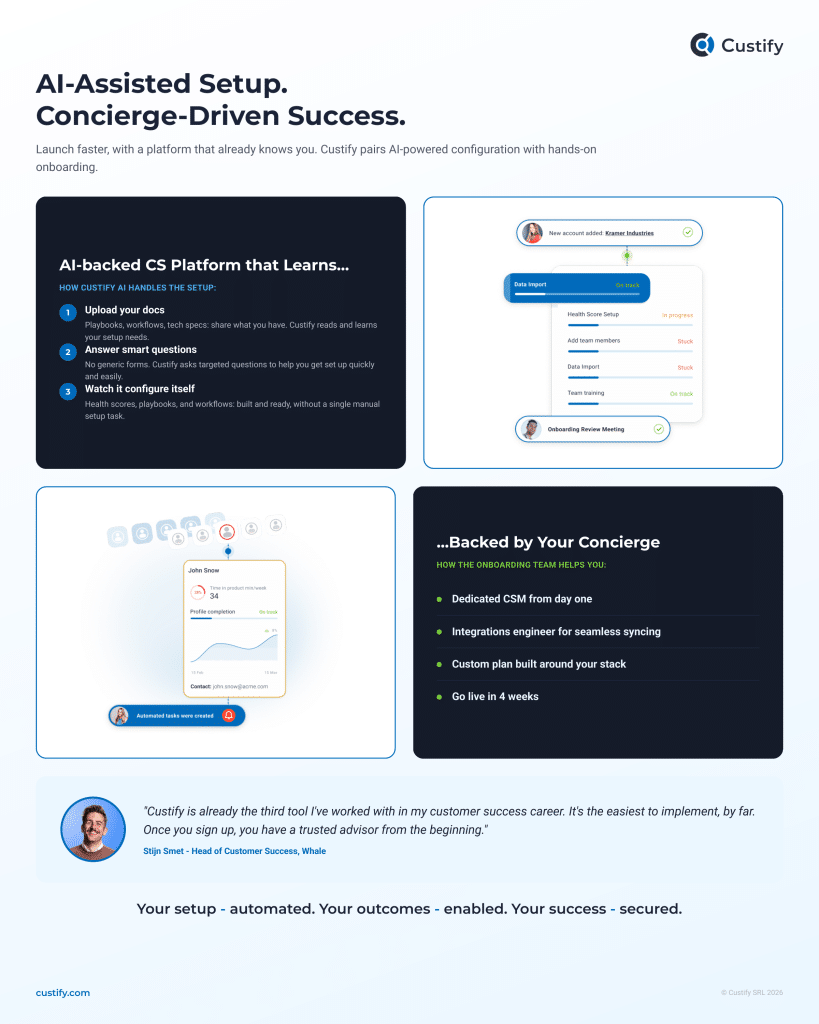
- Concierge onboarding. Once a customer starts their journey with us, they immediately get a lead CSM that will act as a trusted ally throughout the process, from discovery to platform setup to first value. Our experienced CSMs build close relationships with customers, focusing on guiding them towards their goals with our platform.
- AI-assisted implementation. Custify can now read and understand any and all customer knowledge our users bring into the platform. Based on these docs, Custify AI thinks, generates follow-up questions, and then sets up the platform automatically. The customer and lead CSM can then focus on advanced goal tracking, complex metrics, and automation.
One thing remains constant for any SaaS implementation project. If you’re a SaaS vendor, you need to monitor adoption, product usage, the implementation lifecycle, and quickly see any issues that might come up.
Custify’s customer success platform can help you build advanced dashboards where you track your customers’ progress through the implementation stage. And our implementation and onboarding processes can serve as a model for your own. Get in touch with our team, and we’ll walk you through it.