Moving from selling to fifty-person teams to landing contracts with Fortune 500 enterprises feels like a simple price jump, but the reality is broader and deeper. Enterprise SaaS is an operating model, not a bigger invoice. Product architecture, security posture, sales motions, implementation cadences, and customer-success coverage all shift at once, often before the company has hired the people or built the processes to keep pace.
This article focuses on what changes for the teams delivering on the sale: how to know you’re ready, who owns what during onboarding, how customer success coverage has to change, and where AI genuinely helps rather than just sounds impressive.
What Changes When a SaaS Company Moves Upmarket?
Most founders try to anchor “enterprise” to a revenue threshold, but thresholds vary by category and geography. What actually changes is the buyer’s internal machinery: procurement committees appear, legal red lines harden, regional data rules tighten, and vendor responsibility for risk increases. That additional risk does not vanish after signature; it follows the relationship for the life of the contract, particularly once your product needs to sit alongside the enterprise technology platforms the buyer already runs in production.
Industry benchmarks from Ebsta and Pavilion show win rates on deals exceeding $100K ACV dropped to 15-20% down from roughly 26% in late 2022, while fewer than half of enterprise reps hit quota. When the hit rate falls, every wasted cycle is costlier.
Enterprise-Sold vs. Enterprise-Ready
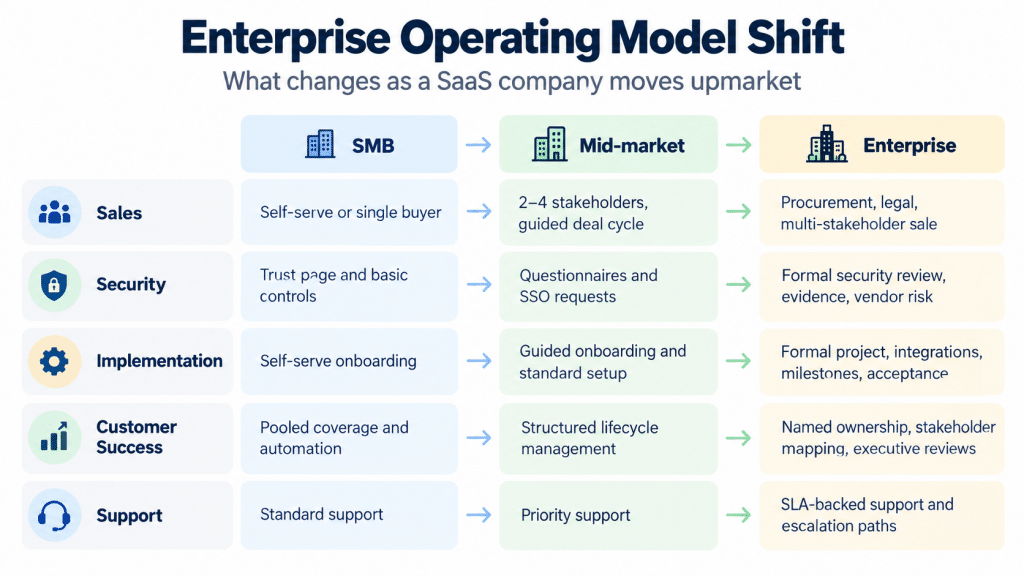
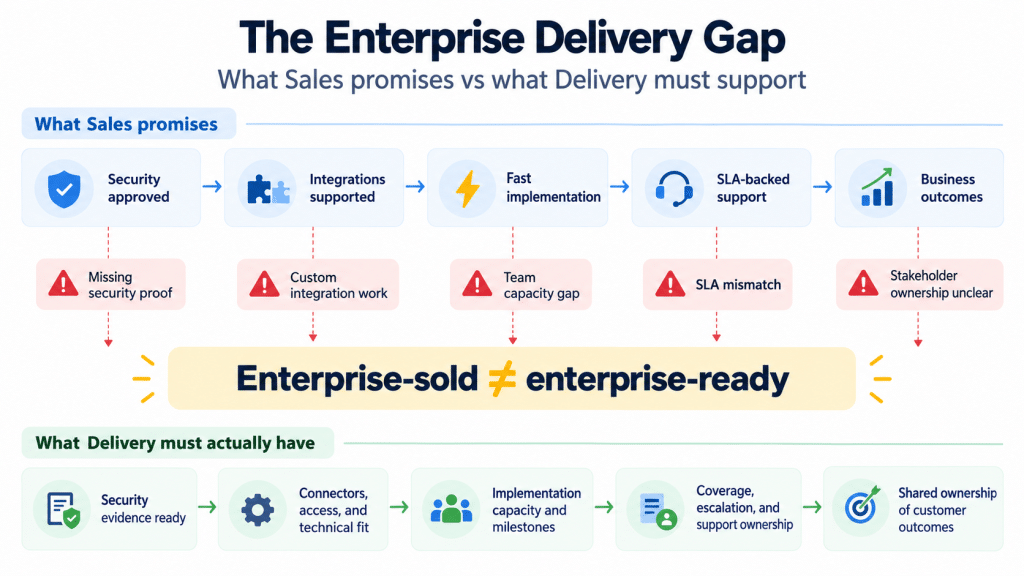
A company can be enterprise-sold well before it is enterprise-ready. That gap is where stalled rollouts, surprise renewal losses, and unbudgeted engineering sprints originate. The quickest internal litmus test is to ask, “Can we implement, secure, and support the next enterprise logo without adding exceptions to our process?”
| Capability | SMB | Mid-Market | Enterprise |
|---|---|---|---|
| Buying process | Self-serve or single call | 2-4 stakeholders, 2-6 week cycle | 6-10 stakeholders, procurement + legal, 3-9 month cycle |
| Security | Trust page | Questionnaire, optional SSO | SOC 2 / ISO 27001, pen test, vendor-risk portal |
| Implementation | Self-onboarding | Guided onboarding, 2-4 weeks | Formal project, 8-16 weeks+, milestones and roles |
| Support | Email / chat | Priority tiers | Contractual SLAs with penalties, 24 × 7 coverage |
| Customer success | Automated lifecycle | Pooled CSM | Named CSM, exec reviews, stakeholder mapping |
The rows appear incremental; their combined impact is not. The table above explains why light-touch “just sell bigger” strategies rarely scale past the second or third large logo.
Is Your Team Ready to Deliver What Sales Promises?
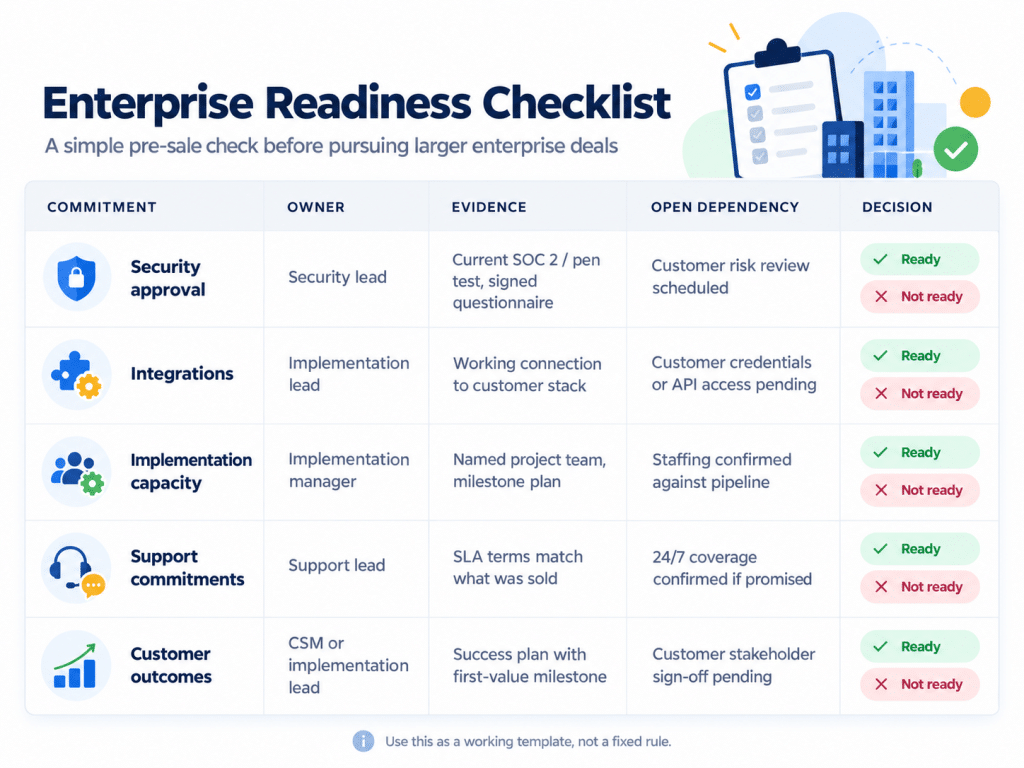
Readiness surfaces as patterns, not a certification. Before you chase the next enterprise logo, it’s worth running the commitments you’d be making through a simple readiness check – one that shows where the gaps are before a signature forces the issue.
Enterprise readiness checklist (illustrative – commitments vary by deal, so treat this as a template to adapt rather than a fixed list)
Security, Integration, and Support Commitments
Enterprise diligence begins earlier and digs deeper than mid-market vendors expect. A prospect’s security team may start its questionnaire before the first live demo, and deficiencies can disqualify a vendor before a champion gets the chance to intervene. Third-party risk is a documented board-level concern: PwC’s 2025 Global Digital Trust Insights survey of more than 4,000 business and technology executives found third-party breaches rank among the top cyber threats organizations feel least prepared for.
Single sign-on alone is no longer enough: buyers increasingly require SCIM for automated provisioning and de-provisioning, and immutable, exportable audit logs. Rather than walk through a page-by-page breakdown of questionnaire timing (see the readiness checklist above instead), the practical point is this: a stale SOC 2 report or an undocumented recovery process tends to trigger follow-up questions and bridge letters, which adds time to review.
Some enterprise contracts require 99.9% or higher availability targets and service-credit terms, depending on the product and buyer. Buyers also want documented RTO/RPO and evidence that recovery has actually been exercised, not just described. Furthermore, a 2025 Gartner survey reveals that 76 percent of enterprise IT buyers rank seamless integration as a top purchase criterion. Consequently, customers will expect connectors to the warehouses they already run (Snowflake, BigQuery, Redshift), not just an API that pushes the integration work onto their team.
Delivery Cost and Customer Fit
Not every enterprise logo is worth winning. Two questions help decide: Can this account be served profitably at the support and implementation tier it needs? And does its use case match where your product is actually strong, or would delivering it require custom work your roadmap can’t absorb long-term?
Rising inbound from 1,000+ employee accounts is a good signal; outbound-forced logos that don’t fit your product are a common source of long-tail churn later. Retool’s 2026 Build vs. Buy Report, based on a survey of 817 enterprise builders, found that 35% of organizations have already replaced a SaaS tool with a custom internal build, and 78% expect to build more in 2026, a reminder that you’re competing against “build it ourselves,” which raises the bar for genuine fit, not just price.
What Must Sales Hand Over Before Enterprise Onboarding?
This is the single most common failure point in enterprise rollouts: implementation starts on a set of assumptions nobody actually confirmed. Before onboarding kicks off, Sales should hand Implementation and the assigned CSM:
- The agreed outcomes and scope – what the customer bought this to achieve, in their own words, not just the feature list
- A named project owner on the customer side – a person, not a role, with the authority to unblock decisions
- Stakeholder map – economic buyer, technical evaluator, and end-user champion, with what each one cares about
- Technical requirements and constraints – known integration points, security review status, any commitments made on timeline
- Non-negotiables raised during the deal – anything Sales conceded or promised that Implementation needs to honor
If any of these is missing, the honest move is to delay kickoff rather than start onboarding on guesswork because a rushed start on an unclear handoff is where most schedule slippage and early churn originate.
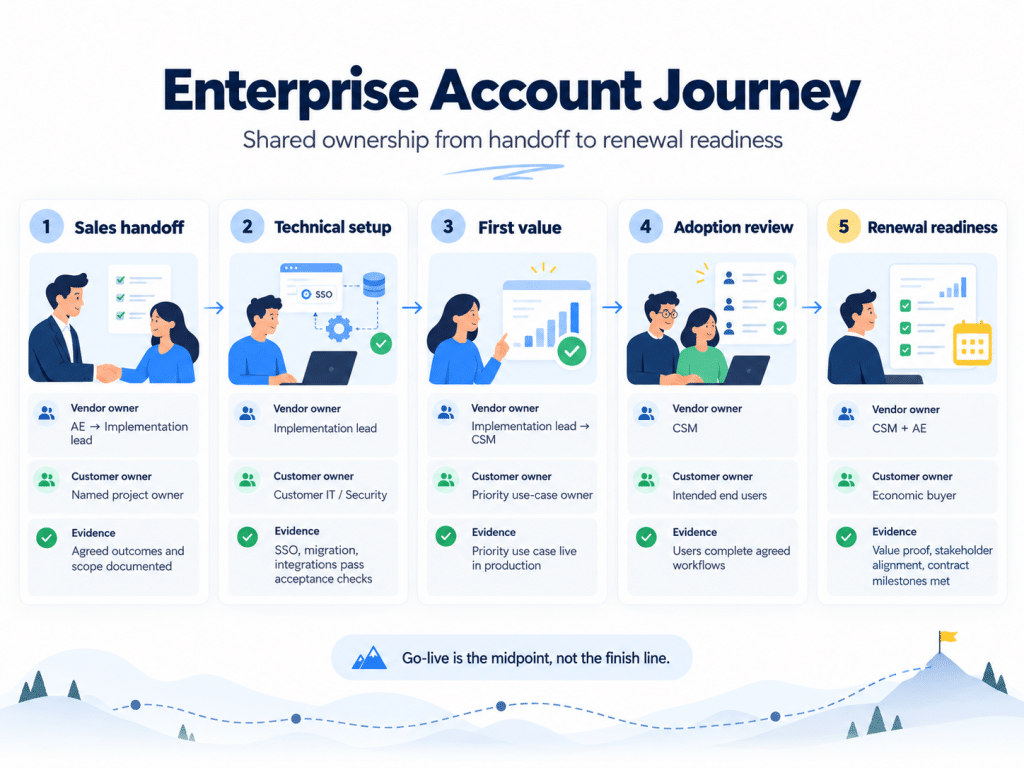
Enterprise Onboarding Needs Shared Ownership
Technical Implementation and Acceptance
The implementation manager’s job is to design a plan that survives staffing changes on the customer’s side. A living project plan with critical-path dependencies like SSO, data migration, and integration tests keeps both sides aligned, and when dates slip, the impact is visible before it surprises anyone in an executive steering meeting.
A specific and frequent oversight: security teams often issue non-production credentials that expire after 14 days. If integration testing runs on day 21, access breaks and the schedule unravels. Experienced implementation managers secure longer-lived staging access up front, and this is exactly the kind of dependency the “technical setup” stage above should surface early rather than discover mid-project.
Treat go-live as the midpoint, not the finish line. A post-launch hypercare window (often 30 days) catches early defects and cements early wins before the implementation team exits.
Training, Adoption, and First Value
Technical readiness doesn’t guarantee people change habits – the gap between finishing implementation and completing onboarding is exactly where enterprise rollouts quietly stall. Training should be sequenced by persona: front-line users care about speed, managers care about dashboards, IT cares about control.
A workable cadence: use-case discovery workshops, then role-based live training (recorded for shift workers), then office-hours drop-ins for the first two weeks post-go-live.
How do you know adoption has actually taken hold, rather than just looking quiet? Confirm that intended users can complete the agreed workflows and achieve the outcomes in the success plan. A quieter support queue can be one input into that judgment, but it isn’t proof on its own; a team can go quiet because they’ve given up on a workflow just as easily as because they’ve mastered it, so the success-plan check is what actually settles the question.
How Enterprise Customer Success Coverage Changes
Textbook customer-success ratios (one CSM per 1,000 SMB customers) fail at enterprise scale because stakeholder count and revenue concentration rise sharply. Losing a single $300K logo can erase the year’s net-retention gains.
Consider a hypothetical account (illustrative example, not an actual customer): a 3,000-employee logistics company signs a two-year enterprise contract for a routing-optimization platform. At handoff, Sales passes along the agreed outcome – cut dispatch planning time by a third within the first quarter – and names the customer’s operations director as project owner. The implementation lead owns technical setup and hits acceptance in week six. The CSM, who owns everything from go-live onward, tracks first value against that specific dispatch-time goal rather than login counts. Eight weeks in, usage plateaus below target. Rather than wait for the renewal conversation, the CSM checks eligible users against actual workflow completion, finds that a regional dispatch team never completed training, and schedules a targeted session resolving the stall well before it becomes a retention risk.
Capacity and Specialist Support
Rather than a fixed ARR-per-CSM ratio, capacity is better set by four factors: account complexity (number of integrations and stakeholders), how much implementation and technical support sits outside the CSM’s own workload, executive sponsor turnover risk, and the number of active outcomes being tracked per account. As a starting point for modeling your own capacity, not an industry benchmark, some enterprise teams use a range around $2-3 million in ARR per named CSM when specialist support is strong and calibrate down from there when it isn’t. Treat this only as a planning example to test against your own churn and workload data.
Specialist roles need unified account views. Custify’s account health tooling is one example of a platform built for exactly this: pulling usage, support, and CRM data into a single health score so implementation, support, and the CSM aren’t each working from a different partial picture. Without something like it, each function sees only its own slice, and the account narrative fragments across calls.
Champions, Buyers, and Executive Reviews
Stakeholder drift is inevitable across multi-year terms. Champions change jobs, procurement rotates, and IT consolidates systems. Proactive mapping tools – spreadsheet or platform – list each person, role, and goal. Quarterly review of the map catches silent churn inside the account.
When a champion departs, convening a status meeting within 30 days to identify a new advocate is good practice; waiting until renewal to address it leaves far less room to rebuild the relationship and confirm the new stakeholder is actually bought in. Multithreading is less visible than a big product launch, but it’s a durable driver of expansion when it’s done consistently.
Executive business reviews (EBRs) are strategic checkpoints, not support summaries – one slide on usage, two on business metrics tied to the buyer’s own KPIs.
| Signal | What to verify | Owner | Action | Follow-up |
|---|---|---|---|---|
| Adoption stalls | Eligible users, workflow completion, direct feedback | CSM | Agree a training plan or resolve the blocker with the customer | Review at the next agreed milestone |
| Champion departs | Who's stepping into the role, their authority and goals | CSM | Convene a status meeting within 30 days | Confirm new advocate before the next EBR |
| Implementation blocker unresolved | Root cause and owner on both sides | Implementation lead + CSM | Escalate jointly with a target resolution date | Confirm resolution before adoption review stage |
Build Renewal Readiness Throughout the Relationship
Rather than treating renewal as a countdown that starts at a fixed number of days out, renewal readiness is really something the account journey above builds continuously: value evidence from the first-value and adoption-review stages, a current stakeholder map, and contract milestones tracked as they’re met rather than reconstructed at the last minute. Legal teams can typically recycle an existing MSA rather than reopening every clause when the relationship has stayed current – the earlier renewal conversations start relative to the contract term, the more of that recycling is possible.
What Breaks, and How Should the Team Respond?
| Failure mode | Typical owner | Response |
|---|---|---|
| Overcustomization erodes engineering velocity | Product lead | Track custom work against roadmap capacity; flag when a deal requires it before signing |
| Late security issues surface after the deal is in motion | Security lead | Run security review earlier in the sales cycle, not after signature |
| Implementation overload burns out the few people who understand integrations | Implementation manager | Cap concurrent enterprise rollouts against actual team capacity |
| A support SLA breach triggers a credit clause | Support lead | Confirm SLA terms match what was actually sold before go-live |
| Internal tickets bounce with no clear owner | Ops / RevOps lead | Assign named owners at each account journey stage (see table above) |
| Poor customer fit seeds long-tail churn | Sales leadership | Apply the delivery-cost and fit criteria before pursuing the logo |
A pre-mortem workshop before pursuing enterprise logos, like listing each failure mode, assigning an owner, designing guardrails, costs a few hours and prevents multi-quarter revenue leakage.
Where AI Can Help the CS Team
Of the places AI touches the enterprise motion, health-score explainability is the one most worth CS teams’ attention: instead of a red/green dashboard with no explanation, newer tools compile a root-cause narrative from usage, tickets, and call notes, so a CSM can act instead of starting an investigation from scratch. Custify’s account health tooling, mentioned above, is one example of this pattern applied to shared account visibility.
One caution: AI summarization that flags negative sentiment in a call around “performance” or “budget,” for instance, is a prompt to go verify what’s actually happening with the account, not proof that a renewal is at risk on its own. Treating a sentiment flag as a settled fact skips the step that actually protects the account.
When Moving Upmarket Is the Wrong Decision
Moving upmarket isn’t the right move for every SaaS company, and staying focused on mid-market isn’t a consolation prize. If your product roadmap, support model, and marketing engine are already performing well on profitable growth, and enterprise interest so far has been occasional rather than a consistent, broad-based pull, staying in your known space can produce a better return than absorbing the cost-to-serve step-change that enterprise requires.
The signals worth watching before committing: Is inbound interest from 1,000+ employee accounts a trend or a handful of one-offs? Would serving those accounts well require hires and processes you haven’t budgeted for? And does your current customer base’s fit with your product actually resemble what enterprise buyers are asking for, or would you be building a second product under one roof? If the honest answer to any of these is unclear, it’s worth staying put a little longer rather than chasing logos your delivery model can’t yet support.
FAQ
1. How long does it take to achieve SOC 2 Type II?
Budget 6-12 months, assuming your controls are already designed and running. Auditors need evidence across a monitoring window, so compressing below six months is rarely possible.
2. Should a company hire an enterprise AE before inbound enterprise interest exists?
No. Enterprise AEs succeed when paired with proven demand. Validate pull-through inbound requests or channel partners first, then staff.
3. Is multi-tenant architecture mandatory for enterprise?
Not always. Single tenant or hybrid is possible and may be able to pass a security review but adds to the operating cost. It is isolation and compliance evidence that is demonstrable that is important!
4. How should we size CSM portfolios for enterprise accounts?
There’s no fixed ratio that holds across companies – see “Capacity and Specialist Support” above for the factors that actually drive it (account complexity, specialist support coverage, and the number of active outcomes per account).