Most CSMs I’ve talked to have a version of the same story. They finish a strong renewal call — the customer gave useful signals, mentioned an upcoming expansion, flagged a concern about one feature — and then something mundane happens. A Slack message comes in. The next call starts early. By the time they open the CRM to log notes, the details have gone soft. They write what they remember, not everything that was said.
That gap between what happened on the call and what actually gets recorded is exactly the problem AI meeting intelligence is built to solve — but closing it requires more than a transcription tool.
It’s not a motivation problem. It’s a systems problem. Expecting CSMs to manually translate every conversation into structured account data — health scores, follow-up tasks, risk signals, renewal context — is a workflow design that breaks under real volume. In most CS teams, the downstream effects show up in ways that are hard to trace back: a handoff that misses something important, a health score that doesn’t reflect a recent shift, a renewal prep that starts from incomplete notes.
Microsoft’s 2023 Work Trend Index found that employees spent 57% of their time communicating in meetings, email, and chat. Another 62% said they spent too much time searching for information during the workday. The more customer conversations a CSM handles, the harder it becomes to capture every commitment, concern, and next step without a reliable post-call process.
The more important question isn’t whether to use these tools — it’s how to connect them to the rest of your CS workflow.
The context problem hiding in plain sight
Customer success runs on continuity. A CSM managing 40 accounts needs to carry context from one call to the next, across QBRs, onboarding check-ins, escalations, and renewal conversations. That context lives in a lot of different places: the CRM, the task list, the account plan, the health score, sometimes a shared doc, sometimes just memory.
When any one of those sources gets stale or incomplete, the cracks start to show. A new CSM inheriting an account reads the notes and gets a partial picture. A renewal manager prepping a call doesn’t know the customer raised a concern three months ago. A CS leader looking at health scores sees data that hasn’t been updated since the last QBR.
The frustrating part is that the information exists — it came up on a call. It just never made it into the system in a form anyone can act on.
Post-call note-taking is where this breaks down most consistently. It’s the last step of a call and the first step of everything that follows. When it’s done manually, in the minutes between back-to-back meetings, it tends to be summary-level at best. The customer’s exact words, the specific feature they complained about, the timeline they mentioned for their next initiative — that kind of detail gets compressed into a two-line note or skipped entirely.
This loss of context affects the customer too. Salesforce reports that 79% of customers expect consistent interactions across departments, yet 56% say they often have to repeat or explain information again to different representatives. A complete account history helps the next person continue the conversation without asking the customer to reconstruct it.
What AI meeting intelligence actually does
Tools like Fathom AI record, transcribe, and summarize customer calls automatically. The CSM doesn’t have to choose between being present on the call and capturing what was said — the transcript is there, the summary is generated, and the action items are pulled out. That’s genuinely useful.
But transcription on its own solves only part of the problem. A transcript sitting in a separate tool, disconnected from the account record, is better than nothing — but it still requires someone to read it, interpret it, and decide what to do with it. The context exists, but it isn’t yet structured account intelligence.
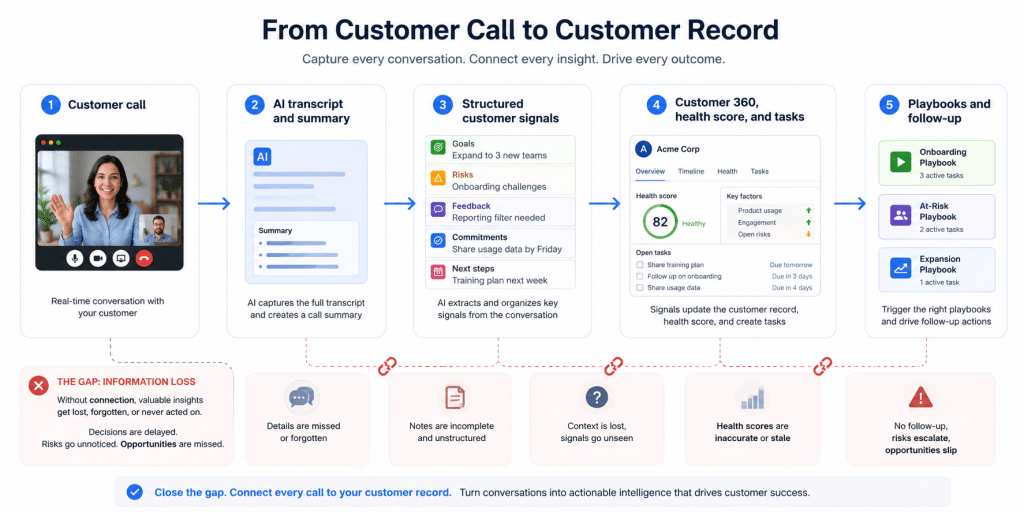
The more interesting shift happens when meeting output connects to the rest of the CS workflow — when a call summary doesn’t just sit in a meeting tool but feeds into the account record, updates task lists, informs health scoring, and contributes to the picture a CSM or manager sees when they open an account.
That’s the difference between meeting transcription and meeting intelligence.
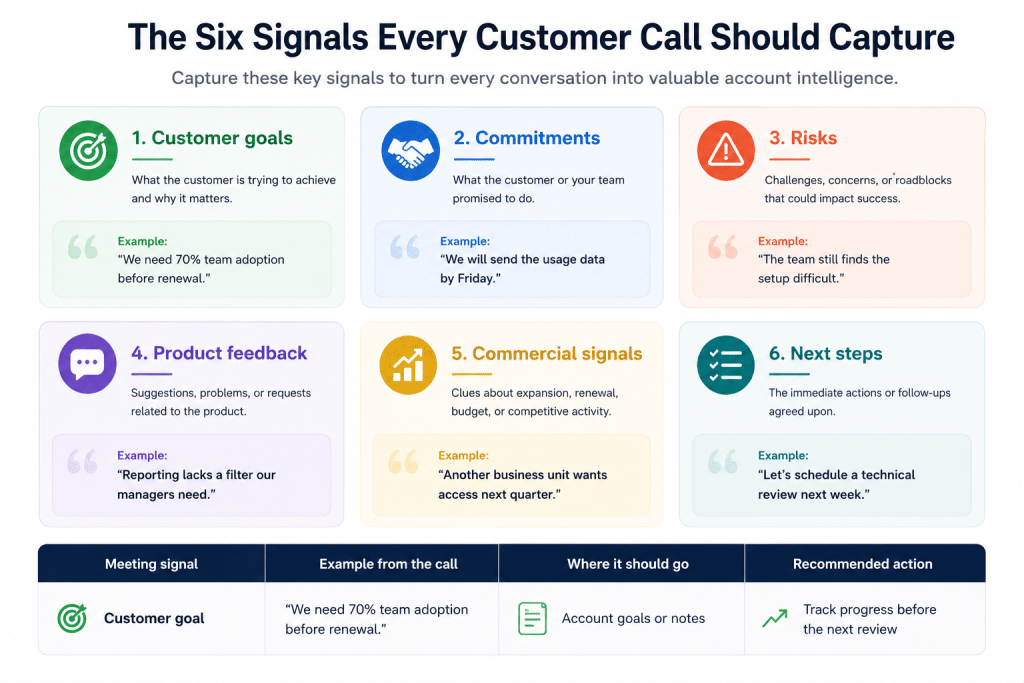
What customer success data should AI capture after a meeting?
Customer success teams should capture six types of post-call information: customer goals, commitments, risks, product feedback, commercial signals, and next steps. A consistent structure makes meeting summaries easier to review, search, compare, and use in automation.
| Meeting Signal | Example from the call | Where it should go | Recommended Action |
|---|---|---|---|
| Customer goal | "We need 70% team adoption before renewal." | Account goals or notes | Track progress before the next review |
| Risk signal | "The team still finds the setup difficult." | Risk field, customer note, or health input | Create a follow-up and review account health |
| Product feedback | "Reporting lacks a filter our managers need." | Product feedback record | Tag the request and route it to the product team |
| Expansion signal | "Another business unit wants access next quarter." | Opportunity or account note | Assign discovery follow-up |
| Customer commitment | "We will send the usage data by Friday." | Task or meeting action item | Add an owner and due date |
| CSM commitment | "I will send the training plan tomorrow." | Task | Assign the owner and due date |
A useful meeting summary separates facts from interpretation. “The customer delayed rollout until September” records a fact. “The customer is likely to churn” records an assessment. Teams should store those signals separately because they carry different levels of certainty and may require different actions.
Where structured data changes the CS workflow
The value of accurate, post-call data shows up in four specific places.
Account handoffs
Handoffs are where context loss is most visible and most costly. When a CSM leaves or an account changes hands, the incoming CSM works from whatever was logged — and if logging was inconsistent, even if it was tracked in tools like Lemlist, they’re essentially starting from scratch. When post-call summaries are consistently captured and tied to the account record, a handoff becomes a structured transfer of context rather than a best-effort reconstruction.
Health scoring
A health score is only as accurate as the data feeding it. If product usage data is clean but call outcomes aren’t captured, the score is missing signal. A customer who mentioned evaluating alternatives on a call last month looks fine in a dashboard that only tracks logins and feature adoption.
Call-based signals — sentiment, escalations, unresolved questions, mentions of renewal hesitation — need to make it into the account record to be useful. Health score templates can help define which signals to track, but they only work if the underlying data is complete.
AI-supported health scoring should preserve the evidence behind each signal. A risk label becomes more useful when the CSM can review the summary, transcript, or meeting moment that triggered it.
Renewal prep
The CSM who runs a renewal well usually walks into that call with a full picture: what the customer cares about, what problems surfaced over the past year, what was promised and whether it was delivered. Most of that history lives in call notes. When those notes are reliable and searchable, renewal prep takes a fraction of the time and produces a sharper conversation — and gives CS leaders a clearer view of net dollar retention trends across the portfolio.
Churn risk detection
Risk signals often show up in conversations before they show up in usage data. A customer who says they’re not sure the team is using the product the way they expected is giving you a signal.
Whether that signal gets flagged depends entirely on whether it was recorded and whether something in the workflow is looking for it. Consistent post-call records create the foundation for that kind of pattern detection — and for the kind of proactive intervention that separates teams who prevent churn from those who react to it. For a deeper look at the mechanics, Custify’s guide to customer churn covers the full range of signals worth tracking.
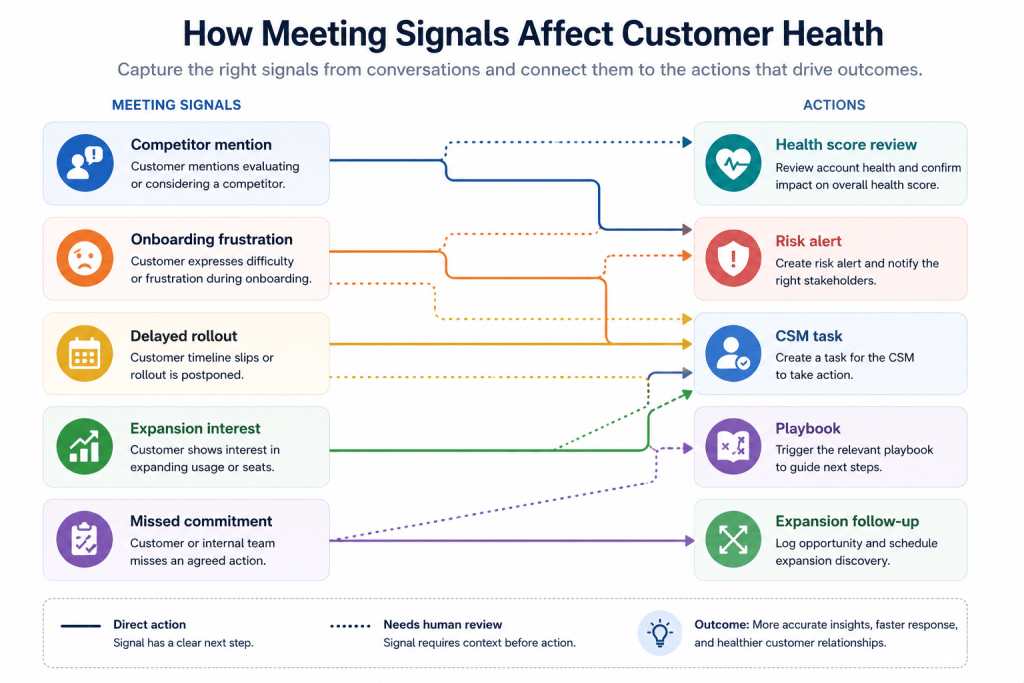
One negative comment may need context. Repeated concerns across several calls may justify a task, a health score change, or a risk playbook.
The workflow gap: From meeting output to account intelligence
Here’s where most teams run into trouble. They add a meeting transcription tool, the summaries are good, and then the CSM still has to manually copy the relevant pieces into the CRM, create follow-up tasks, update account notes, and decide if anything warrants a health score adjustment.
The tool reduced the note-taking burden, but it didn’t close the loop between call output and account record. The CSM is still the integration point.
The teams that get the most value from AI meeting intelligence have thought carefully about what should happen after a call ends — automatically, without the CSM having to orchestrate it. A follow-up task shouldn’t require a CSM to manually create it from a summary they just read. A risk signal that came up on a call should trigger something in the CS platform, not sit in a meeting tool waiting to be noticed.
This is where the connection to the CS platform matters. Custify with its new AI features brings meeting context into the customer record through integrations with meeting intelligence tools such as Gong, Fathom, and Grain. These integrations can add call summaries, transcripts, highlights, action items, decisions, and recording links to the related customer meeting or timeline.
CustifyAI adds another layer by generating customer summaries, analyzing account context, suggesting follow-up actions, and creating playbooks from account information or user instructions.
Custify can use account signals in health scores and playbooks, so customer conversation data can influence what the team sees and what happens next. Teams decide which signals should update account health automatically and which ones need CSM review.
The purpose is to move customer information from the conversation into the systems where the team can use it.
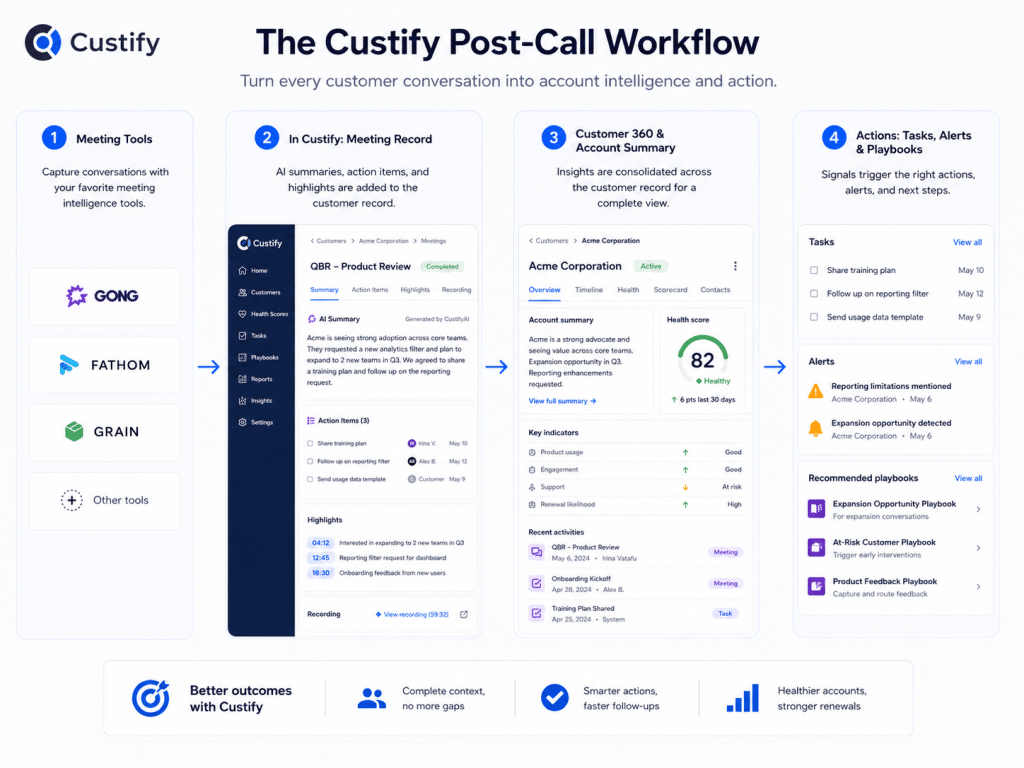
Customer conversations already contain the signals CS teams need to understand risk, progress, and opportunity. The challenge is making sure those signals reach Customer 360 while the context is still fresh. When meeting insights connect to health scores, tasks, and playbooks, CSMs spend less time rebuilding context and more time acting on it.
Philipp Wolf, Founder and CEO, Custify
How to connect AI meeting intelligence to your CS workflow
A working post-call process needs clear capture rules, account matching, action routing, and review points. Use these seven steps to connect meeting output with daily CS work.
1. Define which customer meetings require capture
Decide which calls should generate transcripts, summaries, or structured notes. Renewal calls, onboarding sessions, QBRs, escalations, adoption reviews, and executive check-ins usually contain information that belongs in the account record.
2. Set the fields every summary must capture
Create a standard summary template with customer goals, decisions, risks, commitments, owners, due dates, product feedback, commercial signals, and unresolved questions. Keep the categories stable across teams so managers can compare accounts and review trends.
3. Match each meeting to the correct customer account
Meeting output loses much of its value when the system cannot connect it to the right company, contact, or opportunity. Matching rules should use participants, company domains, meeting time, and calendar details.
4. Route commitments into tasks
Every action item needs an owner, a clear task, and a due date. “Send documentation” is weak. “Maria will send the SSO setup guide by Thursday” gives the team a record it can track.
5. Tag risk, product, and expansion signals
Use a defined set of categories for repeated customer signals. Tags make it easier to review patterns across calls and decide which information should affect account health, product feedback, or commercial follow-up.
6. Keep human review for high-impact changes
A summary can create routine tasks automatically. Changes to churn risk, renewal probability, executive sentiment, or account health may deserve CSM review, especially when one sentence could alter how the team treats the customer.
7. Measure whether the process works
Track note completion, task creation, overdue commitments, account matching errors, and the time CSMs spend preparing for renewals or handoffs. Review a sample of meeting summaries each month to find missing details, incorrect owners, or unsupported risk labels.
How do you keep AI-generated meeting data accurate?
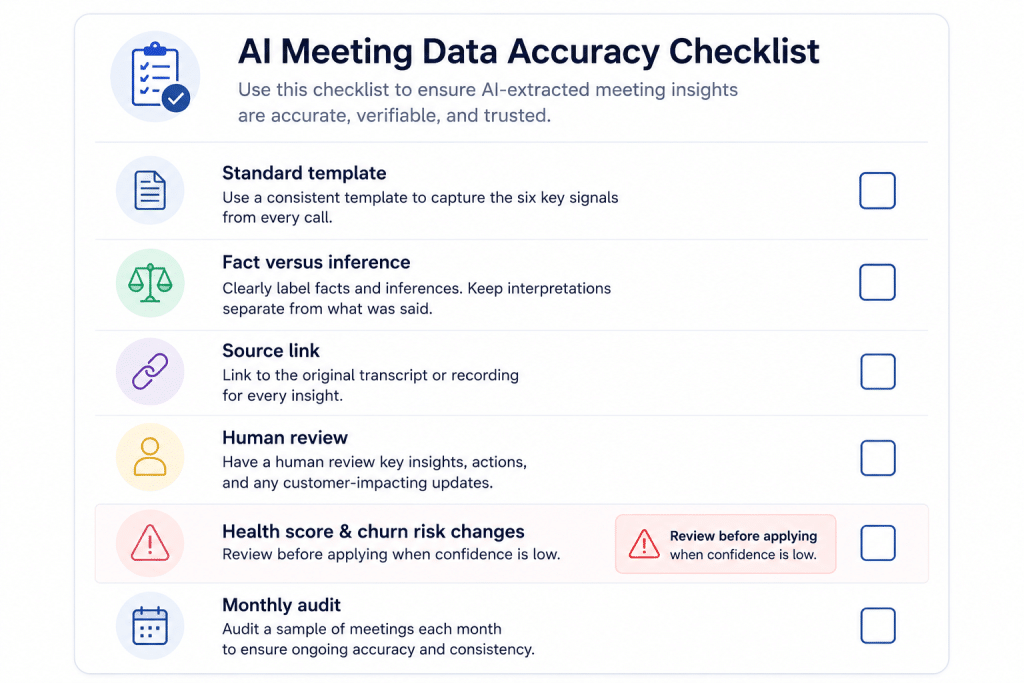
AI-generated meeting data stays reliable when teams use clear templates, preserve the source conversation, review high-impact signals, and audit output quality. AI summaries reduce manual work, but they still require controls.
1. Use meeting-specific summary templates
A renewal call and an onboarding call need different outputs. A renewal template should capture value achieved, unresolved issues, commercial concerns, decision criteria, decision-makers, and next steps. An onboarding template should capture milestones, blockers, responsibilities, training needs, and target dates.
2. Separate direct statements from inferred signals
Record what the customer said before assigning meaning to it. “We are reviewing other vendors” is a direct statement. “High churn risk” is an inferred signal. Keep the original evidence attached to the assessment.
3. Preserve the source context
Keep the transcript, recording link, timestamp, or meeting summary beside important account changes. CSMs should be able to verify a commitment or risk signal without searching through another system.
4. Review high-impact AI output
NIST’s guidance for generative AI recommends added human review, tracking, documentation, and management oversight for higher-impact uses. Apply that principle to account changes that affect renewal forecasts, churn risk, executive reporting, or customer communications.
Source: NIST AI Risk Management guidance
5. Audit a sample every month
Review summaries across different CSMs, call types, accents, and account segments. Look for omitted commitments, incorrect speakers, wrong owners, missing dates, unsupported sentiment labels, and duplicate tasks. Use the findings to adjust templates and routing rules.
What should CS teams check before recording customer calls with AI?
CS teams should define recording notice, lawful use, access, retention, and vendor data rules before deploying AI meeting tools. Customer calls may contain personal information, confidential business details, pricing, security concerns, or product plans.
The UK Information Commissioner’s Office states that organizations recording video conferences should have a valid purpose and tell participants why they are recording, how the recording will be used, and how long it will be kept. Local requirements differ, so legal and security teams should review the rules that apply to each region.
Before rollout, confirm:
- How participants receive notice that recording or transcription is active
- Which lawful basis or consent process applies in each market
- Who can access recordings, transcripts, and summaries
- How long each data type is retained
- Whether customers can request deletion or access
- Which AI models process the data and whether customer data trains those models
- Which call types should never be recorded
- How sensitive customer information is excluded or protected
CustifyAI runs through AWS Bedrock and customer data is not stored in the models beyond response generation. Custify’s AI policy tells users to review AI output before critical business decisions and follow applicable privacy rules.
What good looks like
A CS team that’s got this working well doesn’t look dramatically different from the outside. CSMs still run calls. They’re still the ones building relationships. But the operational layer underneath is more reliable.
After a customer call, the summary is captured automatically and tied to the account. Follow-up tasks exist without the CSM building them from scratch. If a risk signal came up — a competitor mention, a timeline slip, frustration with onboarding — it’s recorded in a form that feeds the health score or triggers a playbook, not just sitting in a transcript somewhere.
When a colleague takes over an account, they open the record and find a coherent history. When a renewal is coming up, the prep work is already largely done. When leadership asks for an account update, the answer doesn’t depend on the CSM reconstructing it from memory.
The underlying principle is simple: every customer conversation is valuable customer intelligence, but the value is only realized if the information from that conversation makes it into the account record in a structured, actionable form. AI meeting intelligence closes that gap consistently, at scale, without putting the burden entirely on the CSM.
A few things worth keeping in mind
None of this works without intentional setup. The quality of AI summaries depends on the quality of the prompts and templates behind them. If you’re not getting useful follow-up tasks from call summaries, look at how those summaries are structured — what they’re being asked to capture, how specific the categories are.
It’s also worth being clear about what AI meeting intelligence can and can’t do. It captures what was said. It doesn’t capture what wasn’t said — the hesitation in a customer’s voice, the thing they almost brought up and then didn’t. CSM judgment still matters. The goal is to reduce the operational overhead that gets in the way of that judgment, not replace it.
And the data is only as useful as the system it feeds. A good post-call summary that doesn’t connect to health scoring, task management, or the account record hasn’t solved the problem — it’s moved it one step downstream. The integration between meeting output and CS platform is where the real leverage is. The customer success metrics that actually matter to leadership — health, expansion, churn risk — depend on that upstream data being complete.
The bottom line
The gap between what happens on a customer call and what gets recorded in the account is one of the most consistent sources of data quality problems in CS teams. It’s not dramatic, and it doesn’t always announce itself clearly — but it compounds over time in handoff friction, stale health scores, and renewal conversations that start from an incomplete picture.
AI meeting intelligence gives CS teams a way to close that gap without asking CSMs to choose between being present on calls and capturing what was said.
The strongest implementations connect meeting output to customer records, tasks, health scores, alerts, and playbooks. They also keep human review where one AI-generated interpretation could affect a renewal forecast, churn assessment, or customer relationship.
That connection turns a good customer call into reliable account data and a clear next action.
Article Reviewed by: Philipp Wolf, Founder and CEO at Custify