Databricks is a unified analytics platform built for large-scale data processing, BI, and machine learning. Many data teams use Databricks SQL Warehouses as the single source of truth for product events, revenue data, usage metrics, and customer attributes.
Customer Success and Revenue Operations teams rely on that data to:
- Calculate product usage and engagement metrics
- Track expansion signals and revenue changes
- Build health score inputs from product events
- Sync lifecycle milestones from internal systems
- Centralize analytics data inside Custify
The Custify Databricks integration allows you to query Databricks SQL Warehouses and sync structured data directly into Custify using secure token authentication.
What can I do with Databricks and Custify?
The Databricks integration lets you import warehouse data into Custify for reporting, segmentation, and automation. You can:
- Sync product usage data to power Health Scores
- Import revenue or billing metrics for expansion tracking
- Pull lifecycle events such as onboarding milestones
- Sync custom attributes stored in Delta tables
- Run incremental syncs based on a timestamp or cursor field
- Perform full syncs for historical backfills
Common use cases include:
Product Usage Sync – Pull event or aggregate usage data from Delta Lake tables to enrich company records in Custify.
Revenue Sync – Sync ARR, MRR, or expansion data from analytics tables maintained by your finance or RevOps team.
Customer Lifecycle Tracking – Import activation dates, feature adoption milestones, or internal scoring logic.
Centralized Reporting – Keep Databricks as your data warehouse while making key metrics actionable inside Custify.
How does Databricks work with Custify?
The integration connects to a Databricks SQL Warehouse using the official SQL connector and executes standard SQL queries.
Connection requires:
- Host, your Databricks workspace hostname
- HTTP Path, pointing to your SQL Warehouse
- Personal Access Token for authentication
- Optional catalog and schema for Unity Catalog setups
Custify connects to the SQL Warehouse, opens a session, runs your query asynchronously, fetches results, and closes the session securely.
Supported data types include:
- STRING, VARCHAR
- INTEGER and numeric types
- BOOLEAN
- DATE and TIMESTAMP
- Complex types such as ARRAY or STRUCT, with optional handling
*Each sync opens and closes its own connection. This keeps the integration stateless and avoids connection leaks.
**Authentication uses Personal Access Tokens stored securely in the data source configuration.
How Do I Activate This Integration?
- In Custify, go to Data Warehouses.
- Select Add Data Source and choose Databricks.

- Enter your Databricks workspace host.
- Enter the SQL Warehouse HTTP Path.

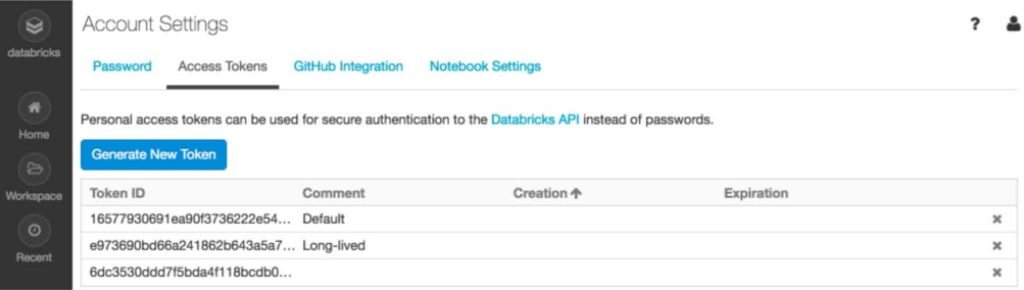
- Generate and paste a Personal Access Token from Databricks User Settings.
- Optionally specify catalog and schema.
- Click Test Connection to validate credentials.
- Save and configure your Data Sync.


To generate a Personal Access Token in Databricks:
- Go to User Settings.
- Navigate to Developer → Access Tokens.
- Generate a new token and copy it securely.
After connecting, configure your table, cursor field, and run type, full or incremental.
Databricks SQL Warehouse must be running and the token must have SELECT permissions on the target tables.