Gong is a revenue intelligence platform that records, transcribes, and analyzes customer conversations. Sales and Customer Success teams use Gong to understand what was said, what was promised, and what risks or opportunities surfaced during calls.
Customer-facing teams use Gong to:
- Capture discovery calls and demos
- Analyze customer objections and buying signals
- Track commitments made during meetings
- Coach reps using real call data
- Surface trends across conversations
The Custify Gong integration connects your call intelligence directly to your customer records, so every relevant meeting in Custify is automatically enriched with Gong AI insights.
What can I do with Gong and Custify?
The Gong integration enriches existing calendar meetings in Custify with structured AI insights from recorded calls. You can:
- Add AI-generated call summaries to meetings
- Store structured outlines of topics discussed
- Surface key highlights and critical moments
- Attach the Gong recording link to the meeting
- View call duration and call date inside Custify
- Keep customer conversations centralized with account data
Common use cases include:
Customer Review Preparation – Quickly understand what was discussed without watching the full recording.
Risk Identification – Spot customer pain points, objections, or escalation signals directly in meeting details.
Commitment Tracking – Review next steps agreed during the call and align internal follow-ups.
Management Visibility – Give leaders access to structured summaries without requiring them to attend every meeting.
How does Gong Work with Custify?
The integration automatically matches Gong call recordings to existing meetings in Custify and enriches them.
Important: The integration does not create new meetings. It only enriches meetings already imported from Gmail or Outlook calendars.
Matching logic includes:
- Participants – Compares people and companies in the Gong call with those in the Custify meeting.
- Time window – Matches calls within a 15-minute window of the calendar event to account for early or late starts.
- Meeting title – Compares the Gong recording title with the calendar event title. Exact matches are not required if participants and time align.
When a match is found, Custify adds:
- AI-generated brief summary
- Structured call outline
- Key highlights grouped by category
- Recording URL
- Call duration and date
- Participant information
All Gong data is stored in a dedicated section of the meeting record. The original meeting details remain unchanged.
How Do I Activate This Integration?
Step 1: Generate Gong API Credentials
- Log in to Gong as an admin.
- Go to Settings → Ecosystem → API.
- Create a new API Key.
- Copy the Access Key and Access Key Secret.
- Store the secret securely, it is shown only once.
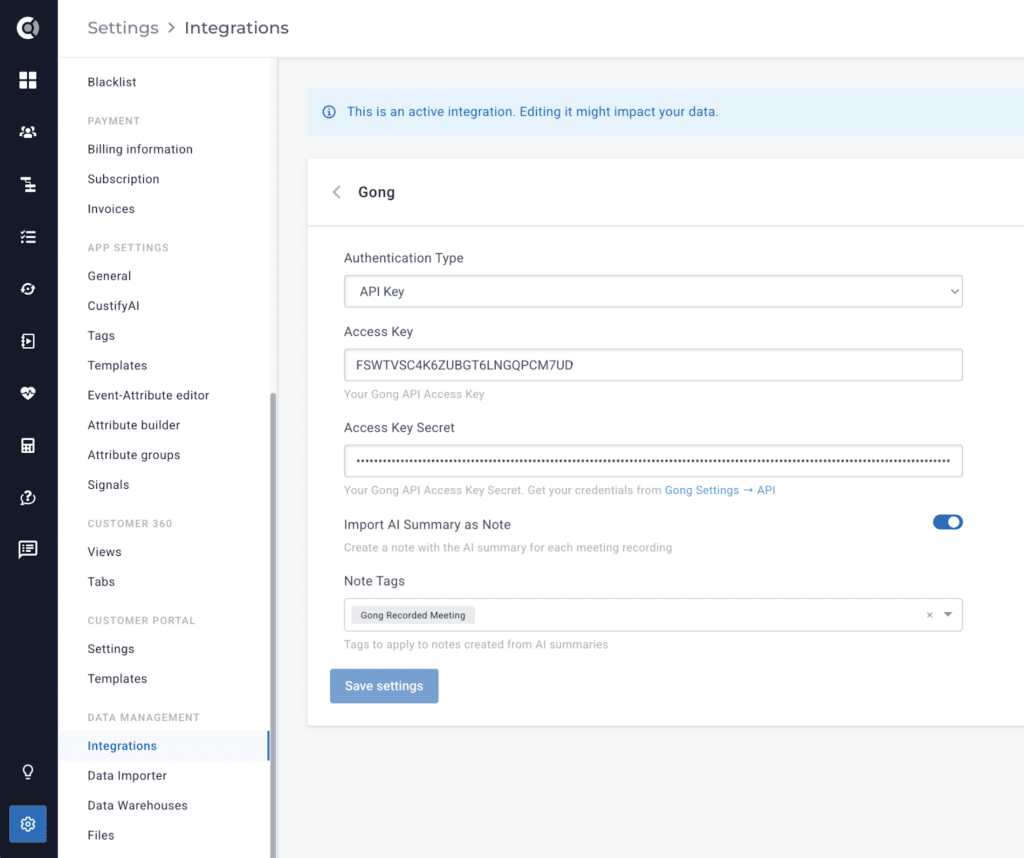
Step 2: Connect Gong in Custify
- In Custify, go to Settings → Integrations.
- Select Gong.
- Enter your Access Key and Access Key Secret.
- Save to activate the integration.
Step 3: Initial Sync
After activation, Custify will:
- Import Gong calls from the last 90 days.
- Match recordings to existing meetings.
- Enrich matching meetings with AI insights.
- Set up ongoing incremental syncs.
Future syncs automatically process new calls from the last 7 days to keep meeting data up to date.